
Hola a todos!!

Here lies the question. For today, I woke up feeling Shakespearean. And one of the things I’ve pondered as we began rolling out all this generative AI business is: do I want to know, or not to know, what my users are doing with it…
And here’s where I open the can of worms, because we’ve all heard the famous phrase “what the eye doesn’t see, the heart doesn’t grieve over,” though I get the feeling that whoever said it clearly never worked in IT.
To me, the answer is obvious: know, always know! Because not knowing is dangerous, unless, of course, you’re after that classic legal excuse of “plausible deniability,” like the lawyers in the movies say. You know things are being done wrong, but you choose to ignore them so you can later play the “I wasn’t aware” card, which, let’s be honest, was all the rage a couple of years ago (already?).
So, if we want to know, we need mechanisms that let us know. And what mechanisms are those? Well, as a good Galician might say: it depends (sorry about the Spanish reference, if anyone has British/US one I’m happy to incorporate it). Mostly on what exactly we want to know, and that’s the core of this whole can of worms. I want to know, yes, but what do I want to know?
The answer to that depends a bit on the state of my environment. As we saw in the previous post, just like deploying Copilot, or any other GenAI tech, depends heavily on that state, so too will the things I worry about be influenced by it.
Let’s look at a list of things I might want to know, and the tools that can help uncover them, and then we’ll talk a bit about each one.
Oversharing
If I had to bet, this would hands down be the frontrunner on my “need to know” list. We already touched on it in the previous post, because when we’re getting ready to deploy Copilot, especially given how closely it’s tied to the whole Microsoft 365 ecosystem, we’ll definitely want to know just how messy the drawer is. And for that, we have a few options, but within M365, the two most basic are:
The first one is going to be incredibly helpful in keeping SharePoint tidy (remember, this is the foundation where all our unstructured data in M365 lives). We have mechanisms to review inactive sites, check which links have been shared inside and outside the organization, and many other things. I actually plan to dedicate a full post to it so you can see everything it can do. It’s true that if you already have a governance plan in place and your environment is more or less in order, this tool might feel a bit redundant, but if you don’t, it’ll make your life a whole lot easier.
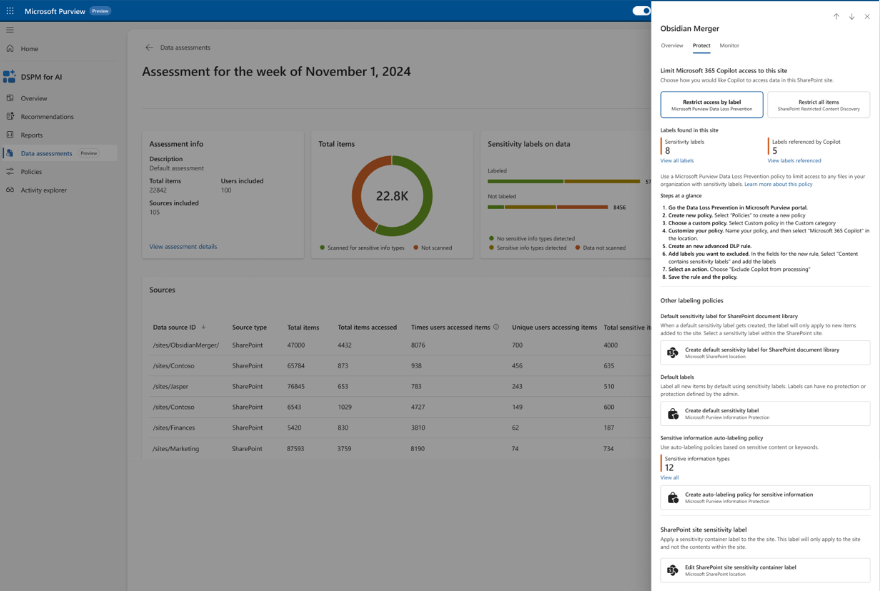
The second one is key, especially if we have serious doubts about the state of our data. It lets us run periodic assessments of the information in our environment, how it’s shared, who’s accessed it, and much more. But on top of that, it also allows us to take some remediation actions. This feature is still in preview, but in my opinion, it’s incredibly useful.
Use of «authorized» AI
This is definitely something we care about, we want to know what our users are asking Copilot. Sure, we’re not going to review every single prompt, but we do want to have a sense of whether someone’s asking things they really shouldn’t be… or even if Copilot is responding with information that, while technically available, maybe shouldn’t be.
The same tool we mentioned earlier, DSPM for AI, is going to give us a ton of insight into the interactions our users are having with Copilot, as well as any potentially sensitive information being shared, whether it’s going out or coming back in.

But when it comes to monitoring internal AI usage (Copilot, ChatGPT*), what’s really going to help us is Communication Compliance.
I had some doubts about whether to bring up Communication Compliance, it’s a tricky topic, and it’ll definitely get its own series of posts later on. But I think it’s essential for monitoring internal AI usage. Mainly because it allows us to set up policies that alert us if a user includes certain keywords in their prompts. And that’s really interesting, because while DSPM for AI gives us a broad overview, it doesn’t alert me if someone is asking Copilot, for example, how to bypass my DLP policies.
The downside? We still don’t have any mechanism to actually block prompts we don’t want people making, which isn’t ideal. But I’m hopeful we’ll see some progress on that front soon enough.
* I’ll fill you in on that one as soon as I get it up and running, so far we haven’t had much luck, but we’ll get there for sure.
Use of «non authorized» AI
This, to me, is the other core of the issue: how many other applications, outside my radar, are my employees using? We’ve already debated the idea of fencing the field, tough, to say the least. But what we can do is monitor some of them, and in some cases, even block the upload of sensitive documents.
Monitoring will happen through DSPM for AI, but it’s supported by Endpoint DLP, meaning if you don’t have Endpoint DLP enabled, you won’t be able to see where your users are browsing or what information they’re uploading to websites.
Microsoft provides a regularly updated list of AI apps, but by using Defender for Cloud Apps, you can set up a monitoring policy to track which AI apps are being used the most—and build your own list from there.
The next step? Define Endpoint DLP policies to block the upload of certain types of sensitive information to those applications.
Types of sensitive information
And finally, because at this point this is starting to sound like one of those “everything you ever wanted to know but were afraid to ask” stories, the next thing we’re going to want to know is: how much sensitive information do I have floating around out there? Where is it? Is it classified?
It’s true that this is an area where Microsoft’s tools fall a bit short. We don’t really have a clear way to get a consolidated report of sensitive info, its locations, and so on. But that’s where third-party tools come in.
So far, the one that’s impressed the most is Synergy Advisors’ solution, mainly because it integrates seamlessly with Purview if you already have it deployed it will be easy to set up. But tools like Varonis, for example, also offer solid reporting capabilities.
Well, at the end this is a bit of long post, but now it is time for you to decide, do you prefer knowing or not knowing? what other things you would like to know? or maybe not know?
Best regards!!
 Lo AsegurarIA