Monitorizar ChatGPT Enterprise con Purview

Hola a todos!!

He estado un rato dándole vueltas a si debería haber llamado a esta entrada: «Una herramienta para monitorizarlo todo…» así rollo señor de los anillos, pero luego he pensado que lo mismo era más fácil de encontrar si el título no era tan freak, debe ser que me hago viejo…
Pero bueno, como con la imagen si puedo jugar, le he pedido a ChatGPT que la genere con ese espíritu (como el resto de imágenes de cada post) y tengo que decir que me encanta el resultado.

Dicho esto, vamos al tema. Esta entrada será la primera puramente técnica, así que no asustarse, ya volveremos a las entradas menos techies más adelante.

Quiero aprovechar para mencionar un par de referencias, en primer lugar la documentación oficial de Microsoft para este tema (https://learn.microsoft.com/en-us/purview/archive-chatgpt-interactions) y el post en el blog de la comunidad de seguridad de Jon Nordstrom (https://techcommunity.microsoft.com/blog/microsoft-security-blog/unlocking-the-power-of-microsoft-purview-for-chatgpt-enterprise/4371239) que realmente es bastante más util que la documentación, pero aun así nos hemos encontrado con algunos desafíos que os explicaré por si consigo ahorraros dolores de cabeza.

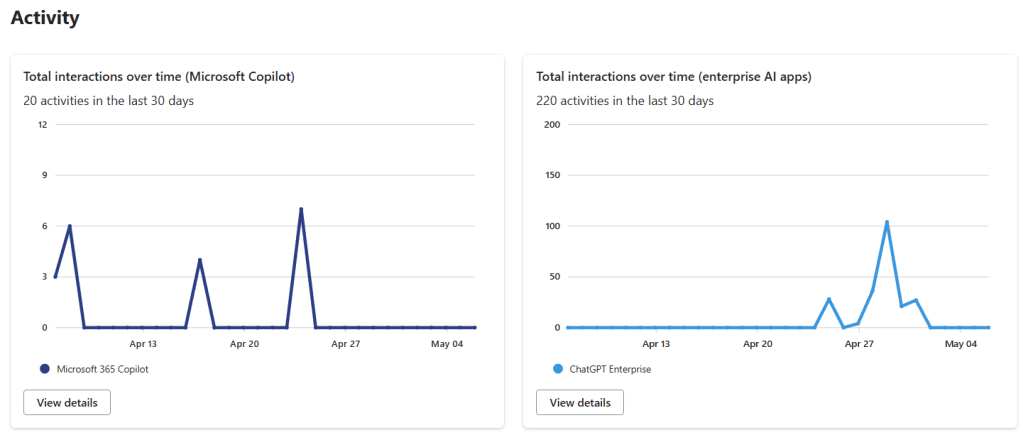
Bien, aquí el objetivo es poder monitorizar las interacciones con ChatGPT Enterprise con Purview, igual que hacemos con Copilot, y además ser capaces de investigar esas interacciones con eDiscovery. El punto es que para conseguirlo, Microsoft ha decidido hacer esta integración utilizando las capacidades de Purview Data Map, que hasta hace bien poco era Azure Data Map, y cuya integración esta todavía un pelín verde en Purview, así que vamos a tener que hacer unas cuantas cosas divertidas, pero lo que queremos conseguir es esto:
Para ello, los pasos de registro y creación del workspace de ChatGPT están bastante bien explicados en la documentación de Microsoft, y sobre todo en el post de Jon, podéis seguirlos sin mucho problema, así que no voy a replicar toda esa parte aquí. Donde nos hemos encontrado con más problemas ha sido en la parte de asignación de permisos que, de hecho no genera ningún error si os la saltáis, simplemente los datos no aparecen en el DSPM for AI de purview, así que esta es la parte que voy a explicar con más detalle.

En primer lugar para que todo esto funcione tenemos que tener una cuenta de Purview de tipo Enterprise, es decir, asociada a una subscripción de azure, porque toda esta monitorización, al tratarse de un sistema externo a Microsoft 365, tiene un cierto coste, no es muy elevado, pero está ahi. La información para configurar esta cuenta la tenéis aqui: https://learn.microsoft.com/en-us/purview/purview-payg-subscription-based-enablement

Una vez tengamos la cuenta, el siguiente paso es darle permisos para que pueda acceder a la API de Purview y de Graph, y aquí es donde hemos encontrado la mayoría de los problemas, así que voy a intentar explicarlo todo lo facil que pueda.

Lo primero que necesitamos es el «ObjectID» de nuestra cuenta de purview, que vamos a suponer que se llama «purview-account» y para efectos de esta demo que el mío es «11111111-aaaa-bbbb-cccc-123456789abc». Para obtener ese ID podemos o bien entrar en el portal de Azure tal como explica Jon en su post, o buscarlo como buscaremos más adelante los otros ID, utilizando el comando Get-MgServicePrincipal, con un filtro:

Get-MgServicePrincipal -Filter "StartsWith(DisplayName, 'PurviewAccount')"

De esta cuenta necesitamos el Id, no el AppID, cuando ejecutemos el comando, nos va a devolver algo parecido a esto:

Ese Id es lo que tenemos que guardar: 11111111-aaaa-bbbb-cccc-123456789abc

Lo siguiente que vamos a necesitar son los ID de los recursos sobre los que vamos a dar los permisos, que cambian para cada tenant, y que tenemos que obtener en base al nombre de los recursos, o al ID que es fijo y que están en el post del blog de Jon, por lo que podemos utilizar esos comandos directamente (el primero para Purview, el segundo para Graph):

(Get-MgServicePrincipal -Filter "AppId eq '9ec59623-ce40-4dc8-a635-ed0275b5d58a'").id
(Get-MgServicePrincipal -Filter "AppId eq '00000003-0000-0000-c000-000000000000'").id

O podemos utilizar los nombres de los recursos que serían:

  • «Purview Ecosystem» para la API de purview
  • «Microsoft Graph» para la API Graph

Como podéis ver en estos casos el AppId coincide con los del post de Jon, pero si queréis estar seguros, el nombre si que es común en todas los tenants. Con esto ya tendríamos los dos ID de los recursos que necesitamos:

  • API Purview: 22222222-aaaa-bbbb-cccc-123456789abc
  • API Graph: 33333333-aaaa-bbbb-cccc-123456789abc

Ya únicamente faltarían los roles que queremos asignar, que son:

  • Purview.ProcessConversationMessages.All en la API de Purview (GUID a4543e1f-6e5d-4ec9-a54a-f3b8c156163f)
  • User.Read.All en la API Graph (GUID df021288-bdef-4463-88db-98f22de89214)

Podéis buscar los GUID en vuestro tenant si no estáis seguros, pero estos no cambian, por lo que debería ser seguro utilizar los que os pongo aquí, de todas formas si queréis buscarlos por seguridad, estos comandos os pueden ayudar:

$app = Get-AzureADServicePrincipal -ObjectId 22222222-aaaa-bbbb-cccc-123456789abc
$app.AppRoles | Where-Object -Property Value -eq 'Purview.ProcessConversationMessages.All'

$app = Get-AzureADServicePrincipal -ObjectId 33333333-aaaa-bbbb-cccc-123456789abc
$app.AppRoles | Where-Object -Property Value -eq 'User.Read.All'

Con esta información ya podemos asignar los roles. En el post de Jon utiliza el comando New-MgServicePrincipalAppRoleAssignment, pero nosotros hemos utilizado New-AzureADServiceAppRoleAssignment, os dejo las dos opciones. Con el primero podemos crear una variable con los parámetros y con el segundo tendremos que incluir los parámetros uno a uno. Cuidado porque tanto en el blog de Jon como en la documentación aparecen algunas llaves por ahí que a nosotros nos han dado problemas. Así quedarían los comandos con los GUID ficticios que tenemos

Usando Graph

$params = @{
	principalId = "11111111-aaaa-bbbb-cccc-123456789abc"
	resourceId = "22222222-aaaa-bbbb-cccc-123456789abc"
	appRoleId = "a4543e1f-6e5d-4ec9-a54a-f3b8c156163f"
}
New-MgServicePrincipalAppRoleAssignment -ServicePrincipalId $servicePrincipalId -BodyParameter $params

$params = @{
	principalId = "11111111-aaaa-bbbb-cccc-123456789abc"
	resourceId = "33333333-aaaa-bbbb-cccc-123456789abc"
	appRoleId = "df021288-bdef-4463-88db-98f22de89214"
}
New-MgServicePrincipalAppRoleAssignment -ServicePrincipalId $servicePrincipalId -BodyParameter $params

Usando AzureAD

New-AzureADServiceAppRoleAssignment  -ObjectId '11111111-aaaa-bbbb-cccc-123456789abc' -PrincipalId '11111111-aaaa-bbbb-cccc-123456789abc' -ResourceId '22222222-aaaa-bbbb-cccc-123456789abc' -Id 'a4543e1f-6e5d-4ec9-a54a-f3b8c156163f'
New-AzureADServiceAppRoleAssignment  -ObjectId '11111111-aaaa-bbbb-cccc-123456789abc' -PrincipalId '11111111-aaaa-bbbb-cccc-123456789abc' -ResourceId '33333333-aaaa-bbbb-cccc-123456789abc' -Id 'df021288-bdef-4463-88db-98f22de89214'

De esta forma nuestra cuenta de purview debería tener los permisos necesarios para que las interacciones con ChatGPT Enterprise empiecen a aparecer en el DSPM for AI y en el Activity Explorer. También podremos encontrarlas con eDiscovery e incluso utilizarlas en Communication Compliance e Insider Risk Management.

OJO!! que esta no es toda la configuración, aun tendríamos que configurar el Key Vault para almacenar las claves de ChatGPT enterprise como se indica en esta documentación. Y añadir el data source al Purview Data map, tal como se explica en el post de Jon, para lo que vais a necesitar información que os debería proporcionar OpenAI. Finalmente hay que configurar los escaneos para que incorporen la información generada por ChatGPT Enterprise en Purview.

Espero que esta entrada os ayude a resolver configurar la integración más fácilmente!

Un Saludo!!

Monitoring ChatGPT Enterprise with Purview

Hello everyone!!

I’ve been mulling over whether I should’ve titled this post “A tool to monitor it all…” you know, like a Lord of the Rings vibe, but then I figured it’d probably be easier to find if the title wasn’t so geeky. Guess I’m getting old…
Anyway, since I can play around with the image, I asked ChatGPT to generate one with that spirit (like I do for all the post images), and I have to say I love how it turned out.

Alright, let’s get to it. This post is going to be the first purely technical one, so don’t panic, we’ll get back to less techie stuff later on.

I want to take the chance to mention a couple of references. First, Microsoft’s official documentation on this topic (https://learn.microsoft.com/en-us/purview/archive-chatgpt-interactions) and Jon Nordstrom’s post on the Microsoft Security community blog (https://techcommunity.microsoft.com/blog/microsoft-security-blog/unlocking-the-power-of-microsoft-purview-for-chatgpt-enterprise/4371239), which is honestly way more useful than the official docs. Even so, we still ran into some challenges that I’ll walk you through in case I can help save you some headaches.

So, the goal here is to monitor interactions with ChatGPT Enterprise using Purview, just like we do with Copilot, and also be able to investigate those interactions with eDiscovery. The thing is that in order to make this work, Microsoft decided to integrate it using Purview Data Map capabilities, which no so long ago, was called Azure Data Map, and this integration is still a bit unpolished in Purview. So we’re going to have to do some fun stuff, but what we want to achieve at the end is something like this:

The steps to register and create the ChatGPT workspace are pretty well explained in Microsoft’s docs, and especially in Jon’s post, you should be able to follow those without much trouble, so I’m not going to repeat that part here. The area where we ran into more issues was the permissions setup. And the kicker is, you won’t get any errors if you skip this part, the data just won’t show up in Purview’s DSPM for AI. So, this is the part I’ll explain in more detail.

First, to get all this working, you need an Enterprise-type Purview account, meaning it’s tied to an Azure subscription, because monitoring an external system like this (outside of Microsoft 365) comes with some cost. It’s not super high, but it’s there. You can find the setup info for the account here: https://learn.microsoft.com/en-us/purview/purview-payg-subscription-based-enablement

Once you have the account, the next step is to grant it permissions to access the Purview and Graph APIs, and this is where we hit most of the snags, so I’ll try to explain it as clearly as possible.

First thing you need is the “ObjectID” of your Purview account. Let’s assume it’s called “purview-account” and, for this demo, mine would be “11111111-aaaa-bbbb-cccc-123456789abc.” To get that ID, you can either go into the Azure portal like Jon explains in his post, or you can pull it up like we’ll do later for the other IDs, using this command: Get-MgServicePrincipal, with a filter:

Get-MgServicePrincipal -Filter "StartsWith(DisplayName, 'PurviewAccount')"

From this account, you need the Id, not the AppID. When you run the command, it’ll return something like this:

That Id is what you need to save: 11111111-aaaa-bbbb-cccc-123456789abc

Next, you need the IDs of the resources you’re going to grant permissions on. These change for each tenant, and you have to get them based on the resource name or the fixed ID, which is in Jon’s blog post, so you can just use these commands (first one is Purview, second one Graph):

(Get-MgServicePrincipal -Filter "AppId eq '9ec59623-ce40-4dc8-a635-ed0275b5d58a'").id
(Get-MgServicePrincipal -Filter "AppId eq '00000003-0000-0000-c000-000000000000'").id

Or you can use the resource names:

  • “Purview Ecosystem” for the Purview API
  • “Microsoft Graph” for the Graph API

As you can see, the AppId matches what’s in Jon’s post, but if you want to be sure, the name is consistent across all tenants. With that, you should have the two resource IDs you need:

  • Purview API: 22222222-aaaa-bbbb-cccc-123456789abc
  • Graph API: 33333333-aaaa-bbbb-cccc-123456789abc

Now, you just need the roles you want to assign, which are:

  • Purview.ProcessConversationMessages.All on the Purview API (GUID: a4543e1f-6e5d-4ec9-a54a-f3b8c156163f)
  • User.Read.All on the Graph API (GUID: df021288-bdef-4463-88db-98f22de89214)

You can look up the GUIDs in your tenant if you’re not sure, but these shouldn’t change, so it should be safe to use the ones I’m giving here. Still, if you want to double-check, these commands will help:

$app = Get-AzureADServicePrincipal -ObjectId 22222222-aaaa-bbbb-cccc-123456789abc
$app.AppRoles | Where-Object -Property Value -eq 'Purview.ProcessConversationMessages.All'

$app = Get-AzureADServicePrincipal -ObjectId 33333333-aaaa-bbbb-cccc-123456789abc
$app.AppRoles | Where-Object -Property Value -eq 'User.Read.All'

With this info, you can assign the roles. Jon’s post uses the New-MgServicePrincipalAppRoleAssignmentcommand, but we used New-AzureADServiceAppRoleAssignment, . I’ll leave you both options here. With the first one, you can create a variable with the parameters, and with the second one, you’ll need to include them one by one. Heads-up: both Jon’s blog and the docs show some brackets that caused us trouble, so be careful. Here’s what the commands would look like with our fake GUIDs:

Using Graph

$params = @{
	principalId = "11111111-aaaa-bbbb-cccc-123456789abc"
	resourceId = "22222222-aaaa-bbbb-cccc-123456789abc"
	appRoleId = "a4543e1f-6e5d-4ec9-a54a-f3b8c156163f"
}
New-MgServicePrincipalAppRoleAssignment -ServicePrincipalId $servicePrincipalId -BodyParameter $params

$params = @{
	principalId = "11111111-aaaa-bbbb-cccc-123456789abc"
	resourceId = "33333333-aaaa-bbbb-cccc-123456789abc"
	appRoleId = "df021288-bdef-4463-88db-98f22de89214"
}
New-MgServicePrincipalAppRoleAssignment -ServicePrincipalId $servicePrincipalId -BodyParameter $params

Using AzureAD

New-AzureADServiceAppRoleAssignment  -ObjectId '11111111-aaaa-bbbb-cccc-123456789abc' -PrincipalId '11111111-aaaa-bbbb-cccc-123456789abc' -ResourceId '22222222-aaaa-bbbb-cccc-123456789abc' -Id 'a4543e1f-6e5d-4ec9-a54a-f3b8c156163f'
New-AzureADServiceAppRoleAssignment  -ObjectId '11111111-aaaa-bbbb-cccc-123456789abc' -PrincipalId '11111111-aaaa-bbbb-cccc-123456789abc' -ResourceId '33333333-aaaa-bbbb-cccc-123456789abc' -Id 'df021288-bdef-4463-88db-98f22de89214'

With that, your Purview account should have the necessary permissions so that the interactions with ChatGPT Enterprise start showing up in DSPM for AI and Activity Explorer. You’ll also be able to find them with eDiscovery and even use them in Communication Compliance and Insider Risk Management.

Heads-up!! This isn’t the full setup, you still need to configure the Key Vault to store the ChatGPT Enterprise keys as explained in this doc. And you need to add the data source to the Purview Data Map, as detailed in Jon’s post, which will require info that OpenAI should provide you. Finally, you have to configure the scans to pull in the ChatGPT Enterprise–generated data into Purview.

Hope this post helps make the integration setup easier for you!

Best regards!!

Saber o no saber

Hola a todos!!

He aquí la cuestión, hoy me he levantado Shakespeariano, y una de las cosas que me he planteado cuando empezamos a desplegar todo esto de la IA generativa es, si quiero saber o no saber, que están haciendo mis usuarios con ello…

Y aquí abro melon, porque todos hemos escuchado la famosa frase de «ojos que no ven, corazón que no siente» aunque me da a mí que quien la mencionó por primera vez, no había trabajado nunca en IT.

Para mi la respuesta es evidente, saber, siempre saber!! Porque no saber es peligroso, salvo que quieras tener un motivo de «negación plausible» como dicen los abogados en las pelis, es decir, que sepas que se están haciendo cosas mal, pero prefieras ignorarlas para luego poder decir aquello de «no me consta» que estuvo tan de moda hace un par de años (¿ya?)

Entonces, si queremos saber, tenemos que tener mecanismos que nos permitan saber, y ¿que mecanismos son esos?, pues como diría un buen gallego: depende. Sobre todo de que queramos saber, y esta es la clave de este melón, yo quiero saber, pero ¿qué quiero saber?

La respuesta a esta pregunta va a depender un poco del estado de mi etorno, tal como veíamos en la entrada anterior, igual que desplegar Copilot, o cualquier otra tecnología de GenAI, depende mucho de dicho estado, las cosas que me van a preocupar también se van a ver influenciadas por este mismo motivo.

Vamos con una lista de cosas que puedo querer saber, y la herramienta que va a ayudar a descubrirlas, y luego comentamos un poco de cada herramienta.

Oversharing

Si tuviera que apostar, este sería sin duda el caballo ganador de lo que quiero saber, ya lo comentamos en la entrada anterior, porque cuando vamos a desplegar principalmente Copilot, por la estrecha relación que tiene con todo el ecosistema Microsoft 365, vamos a querer saber como está de revuelto el cajón. Y para esto tenemos varias opciones, pero en M365 las más básicas son estas dos:

La primera nos va a ayudar muchísimo a mantener todo el SharePoint (que recordemos, es la base donde se almacena toda nuestra información no estructurada en M365) organizado, tenemos mecanismos para revisar sitios inactivos, comprobar que enlaces se han compartido dentro y fuera de la organización, y muchas otras cosas, mi intención es dedicarle alguna entrada en exclusiva para que veáis todo lo que se puede hacer con ello. Es cierto que si ya tenemos un plan de gobierno en marcha, y el entorno está mas o menos ordenado, esta herramienta puede ser un poco redundante, pero si no lo tenemos, nos va a facilitar la vida una barbaridad.

La segunda es clave, sobre todo si tenemos serias dudas sobre el estado de nuestra información. Nos va a permitir realizar evaluaciones periódicas sobre la información que tenemos en el entorno, como está compartida, quien ha accedido y mucha más información, pero además nos va a permitir tomar algunas acciones de remediación. Esta característica está en preview todavía, pero en mi opinión es tremendamente util.

Uso de IA «autorizada»

Esto definitivamente nos interesa, queremos saber que le andan preguntando nuestros usuarios a copilot, vale que no vamos a revisar toooooodos los prompts, pero si queremos tener una idea de si alguien anda preguntando lo que no debe, o incluso si Copilot le está contestando con información que, aunque está disponible, quizás no debería estarlo.

La misma herramienta que hemos comentado antes, DSPM for AI nos va a mostrar muchísima información de las interacciones que nuestros usuarios están teniendo con copilot, y también la información potencialmente sensible que se comparte tanto en una dirección como en la otra.

Pero a la hora de monitorizar el uso de la IA interna (Copilot, ChatGPT*) lo que realmente nos va ayudar es Communication Compliance.

Tenía dudas sobre si hablar de Communication Compliance porque es un tema espinoso, también tendrá su serie de entradas más adelante, pero creo que es imprescindible para monitorizar el uso de la IA a nivel interno. Principalmente porque nos va a permitir configurar políticas que nos alerten si algún usuario utiliza ciertas palabras clave en sus prompts, y esto es muy interesante, porque DSPM for AI nos da información muy general, pero no me alerta si alguien le está preguntando a copilot, por ejemplo, como saltarse mis políticas de DLP.

La parte negativa, aun no tenemos ningún mecanismo para bloquear prompts que no queramos que se hagan, lo cual no es ideal, pero yo espero que no tardando mucho tengamos algún avance en ese aspecto.

* este os lo cuento en cuanto consiga montarlo que de momento no estamos teniendo mucho éxito, pero se arreglará fijo

Uso de IA «no autorizada»

Este para mi, es el otro meollo de la cuestión, ¿cuantas otras aplicaciones que no tengo controladas están usando mis empleados? ya hemos debatido sobre la posibilidad de vallar el campo, difícil como mínimo, pero si que podemos monitorizar algunas y aquí también vamos a poder hasta bloquear la subida de documentos sensibles.

La monitorization la vamos a tener en DSPM for AI, pero va a estar soportada por el DLP de Endpoint, es decir que si no tenéis activado el DLP de Endpoint no vais a poder ver por donde andan navegando vuestros usuarios, y que información están subiendo a las webs.

Microsoft nos proporciona una lista de aplicaciones de IA que van actualizando regularmente, pero utilizando Defender for Cloud Apps podéis configurar una política de monitorización que revise que aplicaciones de IA se están usando más y crear vuestra propia lista.

El siguiente paso sería definir políticas de DLP de Endpoint para que se bloquee la subida de ciertos tipos de información sensible a esas aplicaciones.

Tipo de información que tengo

Por último que esto ya parece una historia de esas de «todo lo que quiso saber y nunca se atrevió a preguntar», lo siguiente que vamos a querer saber es ¿cuanta información sensible tengo por ahi repartida? ¿Donde está? ¿Está clasificada?

Es verdad que aquí las herramientas de Microsoft pinchan un poco, no tenemos una forma clara de obtener un informe de información sensible, ubicaciones, etc. Pero para eso si que hay herramientas de terceros, la que más ha gustado hasta ahora ha sido la de Synergy Advisors, sobre todo porque se integra perfectamente con Purview si ya lo tienes desplegado, pero por ejemplo herramientas como Varonis también tienen buenos informes.


Pero bueno, al final me ha quedado una entrada bastante larga, aunque la realidad es que ahora os toca decidir a vosotros, ¿que preferís, saber o no saber? ¿que otras cosas querríais saber? ¿o que preferís no saber?

Un Saludo!!

To know or not to know

Hola a todos!!

Here lies the question. For today, I woke up feeling Shakespearean. And one of the things I’ve pondered as we began rolling out all this generative AI business is: do I want to know, or not to know, what my users are doing with it…

And here’s where I open the can of worms, because we’ve all heard the famous phrase “what the eye doesn’t see, the heart doesn’t grieve over,” though I get the feeling that whoever said it clearly never worked in IT.

To me, the answer is obvious: know, always know! Because not knowing is dangerous, unless, of course, you’re after that classic legal excuse of “plausible deniability,” like the lawyers in the movies say. You know things are being done wrong, but you choose to ignore them so you can later play the “I wasn’t aware” card, which, let’s be honest, was all the rage a couple of years ago (already?).

So, if we want to know, we need mechanisms that let us know. And what mechanisms are those? Well, as a good Galician might say: it depends (sorry about the Spanish reference, if anyone has British/US one I’m happy to incorporate it). Mostly on what exactly we want to know, and that’s the core of this whole can of worms. I want to know, yes, but what do I want to know?

The answer to that depends a bit on the state of my environment. As we saw in the previous post, just like deploying Copilot, or any other GenAI tech, depends heavily on that state, so too will the things I worry about be influenced by it.

Let’s look at a list of things I might want to know, and the tools that can help uncover them, and then we’ll talk a bit about each one.

Oversharing

If I had to bet, this would hands down be the frontrunner on my “need to know” list. We already touched on it in the previous post, because when we’re getting ready to deploy Copilot, especially given how closely it’s tied to the whole Microsoft 365 ecosystem, we’ll definitely want to know just how messy the drawer is. And for that, we have a few options, but within M365, the two most basic are:

The first one is going to be incredibly helpful in keeping SharePoint tidy (remember, this is the foundation where all our unstructured data in M365 lives). We have mechanisms to review inactive sites, check which links have been shared inside and outside the organization, and many other things. I actually plan to dedicate a full post to it so you can see everything it can do. It’s true that if you already have a governance plan in place and your environment is more or less in order, this tool might feel a bit redundant, but if you don’t, it’ll make your life a whole lot easier.

The second one is key, especially if we have serious doubts about the state of our data. It lets us run periodic assessments of the information in our environment, how it’s shared, who’s accessed it, and much more. But on top of that, it also allows us to take some remediation actions. This feature is still in preview, but in my opinion, it’s incredibly useful.

Use of «authorized» AI

This is definitely something we care about, we want to know what our users are asking Copilot. Sure, we’re not going to review every single prompt, but we do want to have a sense of whether someone’s asking things they really shouldn’t be… or even if Copilot is responding with information that, while technically available, maybe shouldn’t be.

The same tool we mentioned earlier, DSPM for AI, is going to give us a ton of insight into the interactions our users are having with Copilot, as well as any potentially sensitive information being shared, whether it’s going out or coming back in.

But when it comes to monitoring internal AI usage (Copilot, ChatGPT*), what’s really going to help us is Communication Compliance.

I had some doubts about whether to bring up Communication Compliance, it’s a tricky topic, and it’ll definitely get its own series of posts later on. But I think it’s essential for monitoring internal AI usage. Mainly because it allows us to set up policies that alert us if a user includes certain keywords in their prompts. And that’s really interesting, because while DSPM for AI gives us a broad overview, it doesn’t alert me if someone is asking Copilot, for example, how to bypass my DLP policies.

The downside? We still don’t have any mechanism to actually block prompts we don’t want people making, which isn’t ideal. But I’m hopeful we’ll see some progress on that front soon enough.

* I’ll fill you in on that one as soon as I get it up and running, so far we haven’t had much luck, but we’ll get there for sure.

Use of «non authorized» AI

This, to me, is the other core of the issue: how many other applications, outside my radar, are my employees using? We’ve already debated the idea of fencing the field, tough, to say the least. But what we can do is monitor some of them, and in some cases, even block the upload of sensitive documents.

Monitoring will happen through DSPM for AI, but it’s supported by Endpoint DLP, meaning if you don’t have Endpoint DLP enabled, you won’t be able to see where your users are browsing or what information they’re uploading to websites.

Microsoft provides a regularly updated list of AI apps, but by using Defender for Cloud Apps, you can set up a monitoring policy to track which AI apps are being used the most—and build your own list from there.

The next step? Define Endpoint DLP policies to block the upload of certain types of sensitive information to those applications.

Types of sensitive information

And finally, because at this point this is starting to sound like one of those “everything you ever wanted to know but were afraid to ask” stories, the next thing we’re going to want to know is: how much sensitive information do I have floating around out there? Where is it? Is it classified?

It’s true that this is an area where Microsoft’s tools fall a bit short. We don’t really have a clear way to get a consolidated report of sensitive info, its locations, and so on. But that’s where third-party tools come in.

So far, the one that’s impressed the most is Synergy Advisors’ solution, mainly because it integrates seamlessly with Purview if you already have it deployed it will be easy to set up. But tools like Varonis, for example, also offer solid reporting capabilities.


Well, at the end this is a bit of long post, but now it is time for you to decide, do you prefer knowing or not knowing? what other things you would like to know? or maybe not know?

Best regards!!

Vallemos el campo!!

Hola a todos!!

Bueno esta entrada tampoco es puramente técnica, ya llegarán, pero creo que hay que sentar unas bases primero para luego meternos en faena.

¿Cuantas veces hemos escuchado esta frase cuando alguien intenta controlar algo que se antoja dificilmente controlable? Seguramente muchas, y la verdad es que es un poco lo que nos está pasando con la IA generativa y la protección de la información. He visto muchas grandes compañias con mucho miedo a desplegar cualquier tipo de IA generativa asociada al puesto de trabajo, generalmente Copilot, por miedo a «las vergüenzas que pueda sacar», y la verdad es que es un tema espinoso.

Cuando llegamos a este dilema pueden pasar dos cosas:

  • Que tengamos un modelo de gobierno sólido en nuestros entornos de colaboración
  • Que tengamos un maravilloso cajón desastre

Bueno vale, también podemos estar en cualquier punto entre esos dos extremos, pero para que esto sea divertido vamos a suponer que estamos en uno de los dos extemos.

Si estoy en el primer caso, y tengo la casa ordenada y limpia (como decían en Matrix) no debería preocuparme mucho por lo que «la IA» vaya a sacar, seguramente mis usuarios tengan los permisos adecuados, y todo este organizado correctamente, pero por si acaso, voy a repasar un poco lo que significa tener un modelo de gobierno sólido y que cosas deberíamos considerar, principalmente en entornos Microsoft 365 pero extrapolable a otras plataformas:

  • Modelo de creación de sitios organizado: los usuarios siguen unas normas básicas para crear sus sitios/teams, o tienen que hacer una petición para hacerlo.
  • Revisión periódica de sitios: cada X tiempo se revisa si un sitio/teams sigue siendo necesario o no y el propietario del mismo tiene que confirmar, si no, estos sitios son eliminados
  • Revisión periódica de grupos: para asegurarnos de que los empleados que han cambiado de departamento o de compañía han sido retirados de los grupos que les concedían acceso a determinada información.
  • Políticas de retención y borrado: nos van ayudar a definir durante cuanto tiempo queremos mantener nuestros activos de información, y a evitar el síndrome de Diógenes digital.
  • Opciones de compartir: deberíamos tener deshabilitada (o muy controlada) la opción de compartir con anónimos, y la opción de compartir por defecto debería ser personas específicas.
  • Usuarios educados: esta es la más difícil, los usuarios deben tener la formación adecuada para saber cómo compartir la información, revisar los permisos que han dado, y retirarlos si es necesario

Si cumplimos todas estas normas, la preocupación debería ser mínima, no quiere decir que no tengamos que preocuparnos en absoluto, aun hay peligros potenciales, que repasaremos en futuras entradas, pero son relativamente bajos.

¿Qué más elementos podemos configurar para estar aun más seguros? Pues una correcta política de clasificación de la información, con etiquetado que aplique cifrado o que permita una configuración de DLP avanzada es una muy buena práctica, pero es algo complejo de llevar a cabo, especialmente si aplicamos protección en las etiquetas, ya que puede llegar a bloquear partes del negocio, así que tenemos que hacerlo con sumo cuidado, veremos opciones más adelante también. Y otra cosa que podemos hacer es monitorizar las interacciones con la IA, con Copilot es relativamente fácil, y con otras IA puede ser algo más complejo, pero también se puede conseguir. El objetivo es saber que le están preguntando los usuarios a su nuevo juguetito, y si hay alguno investigando algo que no debería…

Pero esto es lo que pasa cuando todo está ordenado, que las cosas son fáciles. Ahora bien, que pasa cuando no tenemos los mecanismos de gobierno que se indicaban arriba, es decir, mis usuarios crean sitios cada día, esos sitios nunca se revisan, cada usuario da acceso a su sitio a quien le parece, y no tengo ninguna política de revisión de sitios, grupos, etc.

Pues entonces SI tengo que estar preocupado por lo que la IA pueda obtener de mi organización si le doy acceso. Pero la solución no es «bloquear la IA» porque esto además de ir en contra de los intereses del negocio, no va a resolver el problema, solamente lo va a meter debajo de la alfombra. Si nos encontramos en esta situación, lo primero que tenemos que definir es una política de gobierno correcta, pero esta política de gobierno va a impactar a los usuarios, que hasta ahora campaban a su anchas por los mundos de Teams y SharePoint, así que es tremendamente importante una correcta gestión del cambio, o tendremos un montón de usuarios cabreados.

Una vez que tengamos un modelo de gobierno en marcha, el siguiente paso es hacer control de daños, y esto tiene que venir después de tener el modelo de gobierno, o acabaremos parcheando sitios hasta el infinito.

Y ¿en que consiste ese control de daños? Pues básicamente en repasar toooodos los sitios, teams, etc. que tenemos en el tenant, y que no tenemos ni idea de qué objetivo tienen, qué información contienen, con quién están compartidos, etc. Es decir, no va a ser fácil, ni rápido, pero es algo que debemos hacer, porque el problema ya no es la IA, la IA es algo que ha revelado una carencia seria de nuestro entorno, los usuarios ya podían acceder a esa información utilizando el buscador, de forma más compleja quizás, pero podían, así que es algo que debemos arreglar.

¿Como lo hacemos? Pues en el caso de Microsoft tenemos un par de herramientas nuevas disponibles para controlar el oversharing, tanto por la parte de SharePoint Advance Management, como por la parte de Purview DSPM, pero además es probable que necesitemos alguna herramienta adicional de terceros, o algún script en PowerShell que nos ayude con ello, mi intención es dedicar una entrada específica (o varias) para ver estas opciones.

En resumen, gran parte de la preocupación de incorporar IA en la empresa, va a venir, no por la IA en si misma, si no por cómo de ordenada este la casa en la que vamos a incorporarla, así que la pregunta es clave ¿Cómo de ordenada está tu casa?

Un Saludo!!

Let’s fence the field!!

Hello everyone!!

Well, this entry isn’t purely technical either, those will come, but I think we need to establish some foundations first before diving into the details.

How many times have we heard this phrase when someone tries to control something that seems nearly uncontrollable? Probably many times. And honestly, that’s a bit like what’s happening with generative AI and information protection. I’ve seen many large companies hesitant to deploy any type of generative AI in the workplace, particularly Copilot, out of fear of «the skeletons it might uncover.» And the truth is, it’s a tricky issue.

When we face this dilemma, two things can happen:

  • We have a solid governance model in our collaboration environments.
  • We have a chaotic mess.

Okay, fine, we might fall somewhere between these two extremes. But to make things interesting, let’s assume we’re at one of the two ends.

If I’m in the first case, and I have my house clean and sanitized (as they said in The Matrix), I shouldn’t worry too much about what «the AI» might uncover. My users likely have the right permissions, and everything is properly organized. But just in case, let’s review what it means to have a solid governance model and what we should consider, primarily in Microsoft 365 environments, though this can be applied to other platforms as well:

  • Organized site creation model: Users follow basic rules for creating their sites/teams or must submit a request to do so.
  • Periodic site reviews: Every X amount of time, we check if a site/team is still necessary. If not, the owner must confirm its relevance, or the site is deleted.
  • Periodic group reviews: To ensure that employees who have changed departments or left the company are removed from groups granting them access to certain information.
  • Retention and deletion policies: These help define how long we want to keep our information assets and prevent digital hoarding.
  • Sharing options: The ability to share with anonymous users should be disabled (or strictly controlled), and the default sharing option should be «specific people.»
  • Educated users: This is the hardest part. Users should be trained on how to share information, review permissions, and revoke access when necessary.

If we follow all these guidelines, concerns should be minimal. This doesn’t mean we can ignore risks entirely, there are still potential threats, which we’ll discuss in future entries, but they are relatively low.

What other measures can we take to enhance security? A proper information classification policy with labeling that applies encryption or enables advanced DLP (Data Loss Prevention) configurations is a great practice. However, implementing this can be complex, especially if label-based protection is applied, as it can disrupt business processes. So, we need to proceed with caution, we’ll explore options in future entries. Another approach is to monitor AI interactions. With Copilot, this is relatively easy, while with other AIs, it may be more challenging but still feasible. The goal is to track what users are asking their new «toy» and ensure no one is investigating things they shouldn’t be.

But this is what happens when everything is in order: things are easy. Now, what happens when we don’t have the governance mechanisms mentioned above? If my users create sites daily, those sites are never reviewed, each user grants access to whomever they want, and there are no policies for site or group reviews…

Then, I do need to worry about what AI might extract from my organization if I give it access. But the solution is not to «block AI». This, aside from going against business interests, won’t solve the problem. It will just sweep it under the rug.

If we find ourselves in this situation, the first step is to establish a proper governance policy. However, this policy will impact users who have been freely roaming around in Teams and SharePoint. Therefore, proper change management is crucial, or we’ll end up with a lot of unhappy users.

Once a governance model is in place, the next step is damage control. This must come after implementing governance; otherwise, we’ll be endlessly patching up sites.

So, what does damage control involve? Essentially, reviewing all the sites, teams, etc., in the tenant that we have no idea about. Their purpose, the information they contain, who they’re shared with, etc. This won’t be easy or quick, but it’s necessary. Because the problem isn’t AI, AI has simply revealed a serious deficiency in our environment. Users could already access this information through search functions, perhaps in a more cumbersome way, but they could, so this is something we must fix.

How do we do it? In the case of Microsoft, we have a couple of new tools to control oversharing, such as SharePoint Advanced Management and Purview DSPM. Additionally, we may need third-party tools or PowerShell scripts to assist with this. My goal is to dedicate a specific post (or multiple) to explore these options.

In summary, much of the concern about integrating AI into a company isn’t about AI itself—it’s about how well-organized the «house» is before introducing it. So, the key question is:

How well organized is your house?

Best regards!!

La potencia sin control…

Hola a todos!!

La verdad es que estaba pensando si empezar este blog (la entrada de presentación no cuenta) explicando un poco cual va a ser su propósito, que vais a poder encontrar y todo eso… O tirarme directamente al barro y he decidido que voy a hacer un poco las dos cosas. Creo que este título es perfecto para la primera entrada, porque me va a permitir contaros de que va esto y empezar a abrir el melón de lo que iremos viendo en futuras entradas.

La cuestión aquí es que cada día tenemos más información, más documentación, y nuevas formas más y más creativas de organizarla y acceder a ella.

Modo abuelo cebolleta: hace 20 años la información estaba en una NAS, organizada en carpetas, y se accedía a ella desde la red corporativa, era fácil de controlar, la mayoría de los equipos eran de sobremesa, todo el mundo trabajaba en la oficina y casi nadie tenía un dispositivo propio para acceder a la información. Alguien podía llevarse información en un USB o en un disco flexible (y rezar para que llegase sana y salva a casa), o enviarla por correo electrónico, pero era relativamente complejo hacer una exfiltración masiva. Además el control de acceso era relativamente simple, y si algo se filtraba también era relativamente simple ver quien tenía acceso y había podido ser el culpable. En algunos casos ya se empezaban a ver gestores documentales, pero de igual manera eran entornos locales, muy pocos estaban publicados en internet, y por lo tanto eran mas «controlables». Y siempre podías entrar en tu datacenter y tirar del cable (no hagáis esto en casa eh…)

Hoy en día esto no es así, la mayoría de la información está en entornos cloud, muchos en localizaciones remotas a las que no tenemos acceso físico y controladas por un hiperescalar (Microsoft, Amazon, Google, etc.) por lo que digamos que es algo más complejo mantener el gobierno de los datos, y además los fabricantes ponen en manos de los usuarios herramientas de inteligencia artificial que nos complican aun más este gobierno. Pero basta ya de lloros, que aquí hemos venido a aprender como hacer las cosas bien en esta «nueva realidad»

Y por eso me viene genial el título para contar de que va a ir el blog. especialmente con la llegada de la IA generativa, la protección de la información es cada día más importante, como decía aquel anuncio de Pirelli, «La potencia sin control no sirve de nada», pero necesitamos la potencia, es decir no podemos pretender bloquear el despliegue de soluciones GenAI, o de que nuestros usuarios no utilicen los datos que tienen a su disposición, porque entonces ¿para qué los tenemos?

Así que el reto es claro: tenemos que ser capaces de definir los mecanismos necesarios para que la explotación de los datos y la IA generativa sean lo más seguros posibles, y de eso va a ir este blog, de las capacidades que tenemos a nuestra disposición para monitorizar y controlar toda esa nueva suerte de herramientas que han llegado para quedarse, que son maravillosas, pero que como toda herramienta, se pueden utilizar de forma maliciosa.

¿Cuáles van a ser esas capacidades? Pues básicamente nos vamos a centrar en entornos Microsoft, y sobre todo en Purview, veremos desde las partes más básicas de herramientas de DLP hasta soluciones avanzadas como Insider Risk Management o Communication Compliance, y además mi intención no es sólo enseñaros a configurarlas, si no también contaros como podéis lidiar con los equipos legales, de cumplimiento y recursos humanos para que el despliegue y configuración de estas herramientas llegue a buen puerto.

Yo creo que con esto más o menos queda claro que vais a encontrar en el blog, que espero que os sea de utilidad.

Un Saludo!

Power without control…

Hello everyone!!

The truth is, I was wondering whether to start this blog (the introduction post doesn’t count) by explaining a bit about its purpose, what you’ll find here, and all that… or just dive straight in. In the end, I decided to do a bit of both. I think this title is perfect for the first post because it allows me to introduce what this blog is about and start opening the discussion on what we’ll be exploring in future entries.

Thing is, every day we have more information, more documentation, and more and more creative ways to organize and access it.

Flashback mode on: 20 years ago, information was stored on a NAS, organized in folders, and accessed via the corporate network. It was easy to control, most devices were desktops, everyone worked in the office, and hardly anyone had a personal device to access information. Sure, someone could take data home on a USB drive or a floppy disk (and pray it arrived safely), or send it via email, but carrying out a massive data exfiltration was relatively complicated. Access control was fairly simple, and if something got leaked, it was usually easy to track down who had access and might be responsible. Some document management systems were beginning to appear, but they were mostly local environments, with very few accessible online, making them more «manageable.» And, worst case scenario, you could always walk into the data center and unplug the cable (don’t try this at home, folks…).

Nowadays, things are very different. Most information is in the cloud, often stored in remote locations we don’t have physical access to, managed by hyperscalers (Microsoft, Amazon, Google, etc.). This makes data governance much more complex. On top of that, vendors are now providing users with AI-powered tools, making data governance even more challenging. But enough complaining, we’re here to learn how to do things right in this «new reality.»

And that’s why I think the title fits perfectly to explain what this blog is all about. Especially with the rise of generative AI, information security is more crucial than ever. As that old Pirelli ad used to say, «Power is nothing without control.» But we need the power, we can’t just block the deployment of GenAI solutions or prevent users from utilizing the data at their disposal. After all, why have the data if we’re not going to use it?

So the challenge is clear: we must establish the right mechanisms to ensure that data utilization and generative AI are as secure as possible. And that’s what this blog is going to be about, the capabilities available to monitor and control this new wave of technology that’s here to stay. These tools are incredible, but like any tool, they can be misused.

What are these capabilities going to be? Basically, we’re going to focus on Microsoft environments, especially Purview. We’ll cover everything from the most basic DLP tools to more advanced solutions like Insider Risk Management and Communication Compliance. But my goal isn’t just to show you how to configure these tools, I also want to help you navigate the challenges of working with legal, compliance, and HR teams to ensure the successful deployment and configuration of these solutions.

I think this gives you a good idea of what you’ll find on this blog, and I hope you find it useful.

Best regards!

Hola a todos!!

Y muy buenos días,

Probablemente la mayoría de vosotros no va a leer esta entrada completa, y me parece bien, el objetivo de este blog no es realmente obtener lectores de cada una de las entradas, si no que sirva como referencia, tanto para mi como para vosotros, de los desafíos y soluciones que me voy encontrando a la hora de gobernar y proteger la IA en mi día a día.

Así que vamos por partes, primero de todo ¿quien soy? Bueno pues me llamo Matías y llevo bastante tiempo dedicado al mundo de la seguridad y las herramientas de colaboración, además soy un apasionado de la innovación, y de los desafíos que supone la implantación de nuevas tecnologías.

Para que conozcáis un poco de mi historial, empecé en el mundo de la seguridad en Informática64, así que sí, ya tengo una edad, y ahi también empecé en el mundo de la gestión documental y la colaboración. Siempre me ha parecido un mundo bastante interesante, pero tremendamente desconocido.

Luego tuve un breve periodo de analista de SharePoint para acabar recayendo en el lado oscuro (Microsoft) durante los últimos 13 años, pasando por soporte proactivo y reactivo y finalmente en la unidad técnica de ventas en el último año y medio, en el que también tuve la suerte de colaborar en el equipo de innovación.

Hace unos meses, decidí que era el momento de cambiar, salir de la «zona de confort» y explorar otras cosas que hasta ahora me había perdido. Así que hace un par de meses escasos me uní a SwissRe, liderando precisamente lo que os voy a ir contando en el blog, todo lo que tiene que ver con la seguridad y el cumplimiento entorno al puesto de trabajo y especialmente a nuestro nuevo mejor amiga: la IA

Y de eso va a ir este blog, pero como decía al inicio, es muy probable que tal y como funciona la información hoy en día, la mayoría prefiráis otros formatos, así que este es el trato, yo voy a ir escribiendo aquí regularmente post cortitos y con algunos tips o información relevante, y al mismo tiempo iré publicando pequeñas píldoras en LinkedIn para los que prefiráis información más escueta, ya me pensaré si lo hago en video contándolo directamente, o por escrito para que lo podáis leer cuando queráis. Pero siempre podréis venir aquí, a ampliar información.

Y dicho esto, nos vemos por aquí!!

PD: Gracias Chema por la idea para el nombre del blog 😉

Hi everyone there!!

And a very good morning to you all,

Most of you probably won’t read this entire post, and that’s fine. The goal of this blog isn’t necessarily to gain readers for every single entry but rather to serve as a reference, both for myself and for you, regarding the challenges and solutions I encounter in my daily work governing and protecting AI.

So, let’s take it step by step. First of all, who am I? Well, my name is Matías, and I’ve been working in the world of security and collaboration tools for quite some time. I’m also passionate about innovation and the challenges that come with implementing new technologies.

To give you a bit of background, I started in the field of security at Informática64, so yes, I’ve been around for a while. That’s also where I first got into document management and collaboration, a field I’ve always found fascinating yet widely misunderstood. After a brief stint as a SharePoint analyst, I ended up on the «dark side» (Microsoft), where I spent the last 13 years working in both proactive and reactive support before moving into the technical sales unit in my last year and a half. During that time, I was also fortunate to collaborate with the innovation team.

A few months ago, I decided it was time for a change, to step out of my «comfort zone» and explore new opportunities I had been missing. So, just a couple of months ago, I joined SwissRe, leading precisely what I’ll be discussing in this blog: everything related to security and compliance in the workplace, with a special focus on our new best friend—AI.

And that’s what this blog will be about. However, as I mentioned at the beginning, given how information is consumed nowadays, many of you will likely prefer other formats. So here’s the deal: I’ll be posting short and informative blog entries here, sharing useful tips or relevant insights. At the same time, I’ll be posting bite-sized updates on LinkedIn for those who prefer more concise information. I’m still deciding whether to do this via video or in written form so you can read it whenever you want. But you’ll always be able to come here for more in-depth information.

That said, I’ll see you around!!

PS: Thanks Chema for the idea to name the blog 😉