Monitoring ChatGPT Enterprise with Purview

Hello everyone!!

I’ve been mulling over whether I should’ve titled this post “A tool to monitor it all…” you know, like a Lord of the Rings vibe, but then I figured it’d probably be easier to find if the title wasn’t so geeky. Guess I’m getting old…
Anyway, since I can play around with the image, I asked ChatGPT to generate one with that spirit (like I do for all the post images), and I have to say I love how it turned out.

Alright, let’s get to it. This post is going to be the first purely technical one, so don’t panic, we’ll get back to less techie stuff later on.

I want to take the chance to mention a couple of references. First, Microsoft’s official documentation on this topic (https://learn.microsoft.com/en-us/purview/archive-chatgpt-interactions) and Jon Nordstrom’s post on the Microsoft Security community blog (https://techcommunity.microsoft.com/blog/microsoft-security-blog/unlocking-the-power-of-microsoft-purview-for-chatgpt-enterprise/4371239), which is honestly way more useful than the official docs. Even so, we still ran into some challenges that I’ll walk you through in case I can help save you some headaches.

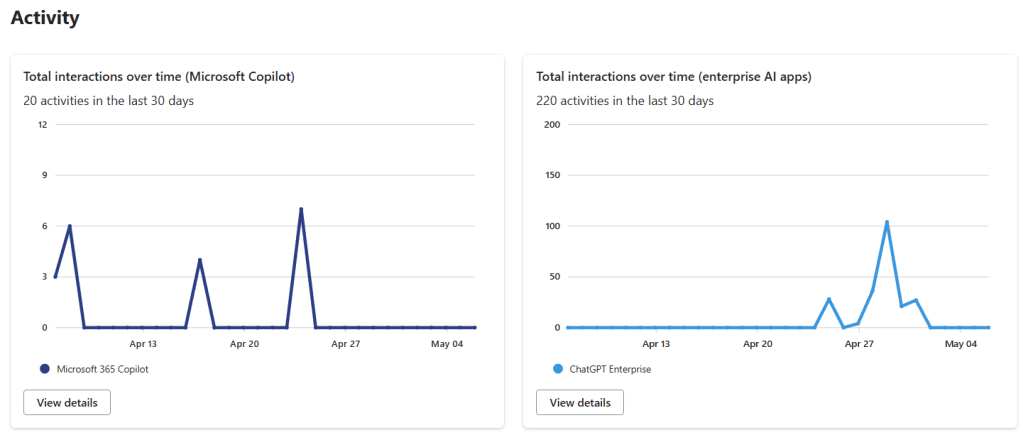
So, the goal here is to monitor interactions with ChatGPT Enterprise using Purview, just like we do with Copilot, and also be able to investigate those interactions with eDiscovery. The thing is that in order to make this work, Microsoft decided to integrate it using Purview Data Map capabilities, which no so long ago, was called Azure Data Map, and this integration is still a bit unpolished in Purview. So we’re going to have to do some fun stuff, but what we want to achieve at the end is something like this:
The steps to register and create the ChatGPT workspace are pretty well explained in Microsoft’s docs, and especially in Jon’s post, you should be able to follow those without much trouble, so I’m not going to repeat that part here. The area where we ran into more issues was the permissions setup. And the kicker is, you won’t get any errors if you skip this part, the data just won’t show up in Purview’s DSPM for AI. So, this is the part I’ll explain in more detail.

First, to get all this working, you need an Enterprise-type Purview account, meaning it’s tied to an Azure subscription, because monitoring an external system like this (outside of Microsoft 365) comes with some cost. It’s not super high, but it’s there. You can find the setup info for the account here: https://learn.microsoft.com/en-us/purview/purview-payg-subscription-based-enablement

Once you have the account, the next step is to grant it permissions to access the Purview and Graph APIs, and this is where we hit most of the snags, so I’ll try to explain it as clearly as possible.

First thing you need is the “ObjectID” of your Purview account. Let’s assume it’s called “purview-account” and, for this demo, mine would be “11111111-aaaa-bbbb-cccc-123456789abc.” To get that ID, you can either go into the Azure portal like Jon explains in his post, or you can pull it up like we’ll do later for the other IDs, using this command: Get-MgServicePrincipal, with a filter:

Get-MgServicePrincipal -Filter "StartsWith(DisplayName, 'PurviewAccount')"

From this account, you need the Id, not the AppID. When you run the command, it’ll return something like this:

That Id is what you need to save: 11111111-aaaa-bbbb-cccc-123456789abc

Next, you need the IDs of the resources you’re going to grant permissions on. These change for each tenant, and you have to get them based on the resource name or the fixed ID, which is in Jon’s blog post, so you can just use these commands (first one is Purview, second one Graph):

(Get-MgServicePrincipal -Filter "AppId eq '9ec59623-ce40-4dc8-a635-ed0275b5d58a'").id
(Get-MgServicePrincipal -Filter "AppId eq '00000003-0000-0000-c000-000000000000'").id

Or you can use the resource names:

  • “Purview Ecosystem” for the Purview API
  • “Microsoft Graph” for the Graph API

As you can see, the AppId matches what’s in Jon’s post, but if you want to be sure, the name is consistent across all tenants. With that, you should have the two resource IDs you need:

  • Purview API: 22222222-aaaa-bbbb-cccc-123456789abc
  • Graph API: 33333333-aaaa-bbbb-cccc-123456789abc

Now, you just need the roles you want to assign, which are:

  • Purview.ProcessConversationMessages.All on the Purview API (GUID: a4543e1f-6e5d-4ec9-a54a-f3b8c156163f)
  • User.Read.All on the Graph API (GUID: df021288-bdef-4463-88db-98f22de89214)

You can look up the GUIDs in your tenant if you’re not sure, but these shouldn’t change, so it should be safe to use the ones I’m giving here. Still, if you want to double-check, these commands will help:

$app = Get-AzureADServicePrincipal -ObjectId 22222222-aaaa-bbbb-cccc-123456789abc
$app.AppRoles | Where-Object -Property Value -eq 'Purview.ProcessConversationMessages.All'

$app = Get-AzureADServicePrincipal -ObjectId 33333333-aaaa-bbbb-cccc-123456789abc
$app.AppRoles | Where-Object -Property Value -eq 'User.Read.All'

With this info, you can assign the roles. Jon’s post uses the New-MgServicePrincipalAppRoleAssignmentcommand, but we used New-AzureADServiceAppRoleAssignment, . I’ll leave you both options here. With the first one, you can create a variable with the parameters, and with the second one, you’ll need to include them one by one. Heads-up: both Jon’s blog and the docs show some brackets that caused us trouble, so be careful. Here’s what the commands would look like with our fake GUIDs:

Using Graph

$params = @{
	principalId = "11111111-aaaa-bbbb-cccc-123456789abc"
	resourceId = "22222222-aaaa-bbbb-cccc-123456789abc"
	appRoleId = "a4543e1f-6e5d-4ec9-a54a-f3b8c156163f"
}
New-MgServicePrincipalAppRoleAssignment -ServicePrincipalId $servicePrincipalId -BodyParameter $params

$params = @{
	principalId = "11111111-aaaa-bbbb-cccc-123456789abc"
	resourceId = "33333333-aaaa-bbbb-cccc-123456789abc"
	appRoleId = "df021288-bdef-4463-88db-98f22de89214"
}
New-MgServicePrincipalAppRoleAssignment -ServicePrincipalId $servicePrincipalId -BodyParameter $params

Using AzureAD

New-AzureADServiceAppRoleAssignment  -ObjectId '11111111-aaaa-bbbb-cccc-123456789abc' -PrincipalId '11111111-aaaa-bbbb-cccc-123456789abc' -ResourceId '22222222-aaaa-bbbb-cccc-123456789abc' -Id 'a4543e1f-6e5d-4ec9-a54a-f3b8c156163f'
New-AzureADServiceAppRoleAssignment  -ObjectId '11111111-aaaa-bbbb-cccc-123456789abc' -PrincipalId '11111111-aaaa-bbbb-cccc-123456789abc' -ResourceId '33333333-aaaa-bbbb-cccc-123456789abc' -Id 'df021288-bdef-4463-88db-98f22de89214'

With that, your Purview account should have the necessary permissions so that the interactions with ChatGPT Enterprise start showing up in DSPM for AI and Activity Explorer. You’ll also be able to find them with eDiscovery and even use them in Communication Compliance and Insider Risk Management.

Heads-up!! This isn’t the full setup, you still need to configure the Key Vault to store the ChatGPT Enterprise keys as explained in this doc. And you need to add the data source to the Purview Data Map, as detailed in Jon’s post, which will require info that OpenAI should provide you. Finally, you have to configure the scans to pull in the ChatGPT Enterprise–generated data into Purview.

Hope this post helps make the integration setup easier for you!

Best regards!!

To know or not to know

Hola a todos!!

Here lies the question. For today, I woke up feeling Shakespearean. And one of the things I’ve pondered as we began rolling out all this generative AI business is: do I want to know, or not to know, what my users are doing with it…

And here’s where I open the can of worms, because we’ve all heard the famous phrase “what the eye doesn’t see, the heart doesn’t grieve over,” though I get the feeling that whoever said it clearly never worked in IT.

To me, the answer is obvious: know, always know! Because not knowing is dangerous, unless, of course, you’re after that classic legal excuse of “plausible deniability,” like the lawyers in the movies say. You know things are being done wrong, but you choose to ignore them so you can later play the “I wasn’t aware” card, which, let’s be honest, was all the rage a couple of years ago (already?).

So, if we want to know, we need mechanisms that let us know. And what mechanisms are those? Well, as a good Galician might say: it depends (sorry about the Spanish reference, if anyone has British/US one I’m happy to incorporate it). Mostly on what exactly we want to know, and that’s the core of this whole can of worms. I want to know, yes, but what do I want to know?

The answer to that depends a bit on the state of my environment. As we saw in the previous post, just like deploying Copilot, or any other GenAI tech, depends heavily on that state, so too will the things I worry about be influenced by it.

Let’s look at a list of things I might want to know, and the tools that can help uncover them, and then we’ll talk a bit about each one.

Oversharing

If I had to bet, this would hands down be the frontrunner on my “need to know” list. We already touched on it in the previous post, because when we’re getting ready to deploy Copilot, especially given how closely it’s tied to the whole Microsoft 365 ecosystem, we’ll definitely want to know just how messy the drawer is. And for that, we have a few options, but within M365, the two most basic are:

The first one is going to be incredibly helpful in keeping SharePoint tidy (remember, this is the foundation where all our unstructured data in M365 lives). We have mechanisms to review inactive sites, check which links have been shared inside and outside the organization, and many other things. I actually plan to dedicate a full post to it so you can see everything it can do. It’s true that if you already have a governance plan in place and your environment is more or less in order, this tool might feel a bit redundant, but if you don’t, it’ll make your life a whole lot easier.

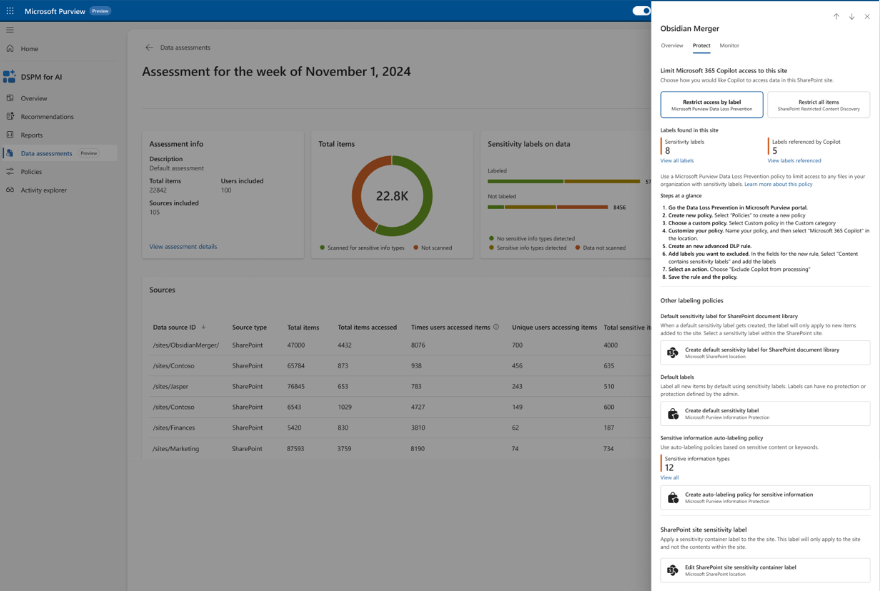
The second one is key, especially if we have serious doubts about the state of our data. It lets us run periodic assessments of the information in our environment, how it’s shared, who’s accessed it, and much more. But on top of that, it also allows us to take some remediation actions. This feature is still in preview, but in my opinion, it’s incredibly useful.

Use of «authorized» AI

This is definitely something we care about, we want to know what our users are asking Copilot. Sure, we’re not going to review every single prompt, but we do want to have a sense of whether someone’s asking things they really shouldn’t be… or even if Copilot is responding with information that, while technically available, maybe shouldn’t be.

The same tool we mentioned earlier, DSPM for AI, is going to give us a ton of insight into the interactions our users are having with Copilot, as well as any potentially sensitive information being shared, whether it’s going out or coming back in.

But when it comes to monitoring internal AI usage (Copilot, ChatGPT*), what’s really going to help us is Communication Compliance.

I had some doubts about whether to bring up Communication Compliance, it’s a tricky topic, and it’ll definitely get its own series of posts later on. But I think it’s essential for monitoring internal AI usage. Mainly because it allows us to set up policies that alert us if a user includes certain keywords in their prompts. And that’s really interesting, because while DSPM for AI gives us a broad overview, it doesn’t alert me if someone is asking Copilot, for example, how to bypass my DLP policies.

The downside? We still don’t have any mechanism to actually block prompts we don’t want people making, which isn’t ideal. But I’m hopeful we’ll see some progress on that front soon enough.

* I’ll fill you in on that one as soon as I get it up and running, so far we haven’t had much luck, but we’ll get there for sure.

Use of «non authorized» AI

This, to me, is the other core of the issue: how many other applications, outside my radar, are my employees using? We’ve already debated the idea of fencing the field, tough, to say the least. But what we can do is monitor some of them, and in some cases, even block the upload of sensitive documents.

Monitoring will happen through DSPM for AI, but it’s supported by Endpoint DLP, meaning if you don’t have Endpoint DLP enabled, you won’t be able to see where your users are browsing or what information they’re uploading to websites.

Microsoft provides a regularly updated list of AI apps, but by using Defender for Cloud Apps, you can set up a monitoring policy to track which AI apps are being used the most—and build your own list from there.

The next step? Define Endpoint DLP policies to block the upload of certain types of sensitive information to those applications.

Types of sensitive information

And finally, because at this point this is starting to sound like one of those “everything you ever wanted to know but were afraid to ask” stories, the next thing we’re going to want to know is: how much sensitive information do I have floating around out there? Where is it? Is it classified?

It’s true that this is an area where Microsoft’s tools fall a bit short. We don’t really have a clear way to get a consolidated report of sensitive info, its locations, and so on. But that’s where third-party tools come in.

So far, the one that’s impressed the most is Synergy Advisors’ solution, mainly because it integrates seamlessly with Purview if you already have it deployed it will be easy to set up. But tools like Varonis, for example, also offer solid reporting capabilities.


Well, at the end this is a bit of long post, but now it is time for you to decide, do you prefer knowing or not knowing? what other things you would like to know? or maybe not know?

Best regards!!

Let’s fence the field!!

Hello everyone!!

Well, this entry isn’t purely technical either, those will come, but I think we need to establish some foundations first before diving into the details.

How many times have we heard this phrase when someone tries to control something that seems nearly uncontrollable? Probably many times. And honestly, that’s a bit like what’s happening with generative AI and information protection. I’ve seen many large companies hesitant to deploy any type of generative AI in the workplace, particularly Copilot, out of fear of «the skeletons it might uncover.» And the truth is, it’s a tricky issue.

When we face this dilemma, two things can happen:

  • We have a solid governance model in our collaboration environments.
  • We have a chaotic mess.

Okay, fine, we might fall somewhere between these two extremes. But to make things interesting, let’s assume we’re at one of the two ends.

If I’m in the first case, and I have my house clean and sanitized (as they said in The Matrix), I shouldn’t worry too much about what «the AI» might uncover. My users likely have the right permissions, and everything is properly organized. But just in case, let’s review what it means to have a solid governance model and what we should consider, primarily in Microsoft 365 environments, though this can be applied to other platforms as well:

  • Organized site creation model: Users follow basic rules for creating their sites/teams or must submit a request to do so.
  • Periodic site reviews: Every X amount of time, we check if a site/team is still necessary. If not, the owner must confirm its relevance, or the site is deleted.
  • Periodic group reviews: To ensure that employees who have changed departments or left the company are removed from groups granting them access to certain information.
  • Retention and deletion policies: These help define how long we want to keep our information assets and prevent digital hoarding.
  • Sharing options: The ability to share with anonymous users should be disabled (or strictly controlled), and the default sharing option should be «specific people.»
  • Educated users: This is the hardest part. Users should be trained on how to share information, review permissions, and revoke access when necessary.

If we follow all these guidelines, concerns should be minimal. This doesn’t mean we can ignore risks entirely, there are still potential threats, which we’ll discuss in future entries, but they are relatively low.

What other measures can we take to enhance security? A proper information classification policy with labeling that applies encryption or enables advanced DLP (Data Loss Prevention) configurations is a great practice. However, implementing this can be complex, especially if label-based protection is applied, as it can disrupt business processes. So, we need to proceed with caution, we’ll explore options in future entries. Another approach is to monitor AI interactions. With Copilot, this is relatively easy, while with other AIs, it may be more challenging but still feasible. The goal is to track what users are asking their new «toy» and ensure no one is investigating things they shouldn’t be.

But this is what happens when everything is in order: things are easy. Now, what happens when we don’t have the governance mechanisms mentioned above? If my users create sites daily, those sites are never reviewed, each user grants access to whomever they want, and there are no policies for site or group reviews…

Then, I do need to worry about what AI might extract from my organization if I give it access. But the solution is not to «block AI». This, aside from going against business interests, won’t solve the problem. It will just sweep it under the rug.

If we find ourselves in this situation, the first step is to establish a proper governance policy. However, this policy will impact users who have been freely roaming around in Teams and SharePoint. Therefore, proper change management is crucial, or we’ll end up with a lot of unhappy users.

Once a governance model is in place, the next step is damage control. This must come after implementing governance; otherwise, we’ll be endlessly patching up sites.

So, what does damage control involve? Essentially, reviewing all the sites, teams, etc., in the tenant that we have no idea about. Their purpose, the information they contain, who they’re shared with, etc. This won’t be easy or quick, but it’s necessary. Because the problem isn’t AI, AI has simply revealed a serious deficiency in our environment. Users could already access this information through search functions, perhaps in a more cumbersome way, but they could, so this is something we must fix.

How do we do it? In the case of Microsoft, we have a couple of new tools to control oversharing, such as SharePoint Advanced Management and Purview DSPM. Additionally, we may need third-party tools or PowerShell scripts to assist with this. My goal is to dedicate a specific post (or multiple) to explore these options.

In summary, much of the concern about integrating AI into a company isn’t about AI itself—it’s about how well-organized the «house» is before introducing it. So, the key question is:

How well organized is your house?

Best regards!!

Power without control…

Hello everyone!!

The truth is, I was wondering whether to start this blog (the introduction post doesn’t count) by explaining a bit about its purpose, what you’ll find here, and all that… or just dive straight in. In the end, I decided to do a bit of both. I think this title is perfect for the first post because it allows me to introduce what this blog is about and start opening the discussion on what we’ll be exploring in future entries.

Thing is, every day we have more information, more documentation, and more and more creative ways to organize and access it.

Flashback mode on: 20 years ago, information was stored on a NAS, organized in folders, and accessed via the corporate network. It was easy to control, most devices were desktops, everyone worked in the office, and hardly anyone had a personal device to access information. Sure, someone could take data home on a USB drive or a floppy disk (and pray it arrived safely), or send it via email, but carrying out a massive data exfiltration was relatively complicated. Access control was fairly simple, and if something got leaked, it was usually easy to track down who had access and might be responsible. Some document management systems were beginning to appear, but they were mostly local environments, with very few accessible online, making them more «manageable.» And, worst case scenario, you could always walk into the data center and unplug the cable (don’t try this at home, folks…).

Nowadays, things are very different. Most information is in the cloud, often stored in remote locations we don’t have physical access to, managed by hyperscalers (Microsoft, Amazon, Google, etc.). This makes data governance much more complex. On top of that, vendors are now providing users with AI-powered tools, making data governance even more challenging. But enough complaining, we’re here to learn how to do things right in this «new reality.»

And that’s why I think the title fits perfectly to explain what this blog is all about. Especially with the rise of generative AI, information security is more crucial than ever. As that old Pirelli ad used to say, «Power is nothing without control.» But we need the power, we can’t just block the deployment of GenAI solutions or prevent users from utilizing the data at their disposal. After all, why have the data if we’re not going to use it?

So the challenge is clear: we must establish the right mechanisms to ensure that data utilization and generative AI are as secure as possible. And that’s what this blog is going to be about, the capabilities available to monitor and control this new wave of technology that’s here to stay. These tools are incredible, but like any tool, they can be misused.

What are these capabilities going to be? Basically, we’re going to focus on Microsoft environments, especially Purview. We’ll cover everything from the most basic DLP tools to more advanced solutions like Insider Risk Management and Communication Compliance. But my goal isn’t just to show you how to configure these tools, I also want to help you navigate the challenges of working with legal, compliance, and HR teams to ensure the successful deployment and configuration of these solutions.

I think this gives you a good idea of what you’ll find on this blog, and I hope you find it useful.

Best regards!

Hi everyone there!!

And a very good morning to you all,

Most of you probably won’t read this entire post, and that’s fine. The goal of this blog isn’t necessarily to gain readers for every single entry but rather to serve as a reference, both for myself and for you, regarding the challenges and solutions I encounter in my daily work governing and protecting AI.

So, let’s take it step by step. First of all, who am I? Well, my name is Matías, and I’ve been working in the world of security and collaboration tools for quite some time. I’m also passionate about innovation and the challenges that come with implementing new technologies.

To give you a bit of background, I started in the field of security at Informática64, so yes, I’ve been around for a while. That’s also where I first got into document management and collaboration, a field I’ve always found fascinating yet widely misunderstood. After a brief stint as a SharePoint analyst, I ended up on the «dark side» (Microsoft), where I spent the last 13 years working in both proactive and reactive support before moving into the technical sales unit in my last year and a half. During that time, I was also fortunate to collaborate with the innovation team.

A few months ago, I decided it was time for a change, to step out of my «comfort zone» and explore new opportunities I had been missing. So, just a couple of months ago, I joined SwissRe, leading precisely what I’ll be discussing in this blog: everything related to security and compliance in the workplace, with a special focus on our new best friend—AI.

And that’s what this blog will be about. However, as I mentioned at the beginning, given how information is consumed nowadays, many of you will likely prefer other formats. So here’s the deal: I’ll be posting short and informative blog entries here, sharing useful tips or relevant insights. At the same time, I’ll be posting bite-sized updates on LinkedIn for those who prefer more concise information. I’m still deciding whether to do this via video or in written form so you can read it whenever you want. But you’ll always be able to come here for more in-depth information.

That said, I’ll see you around!!

PS: Thanks Chema for the idea to name the blog 😉